As developers, we frequently use version control systems like Git to manage our codebase. One feature in Git that can be both powerful and potentially problematic if misused is cherry-picking.
What is Cherry-Picking in Git?
Cherry-picking is a feature that allows you to apply a specific commit from one branch into another. This can be incredibly useful for applying bug fixes or features without merging an entire branch. However, it should be used with caution.
When to Use Cherry-Picking
Bug Fixes: If you need to apply a critical bug fix from one branch to another without merging all the changes.
Selective Features: When you want to include a specific feature or change without integrating all branch changes.
Cherry-Picking Command
To cherry-pick a commit, you can use the following command:
git cherry-pick
Replace <commit-hash> with the hash of the commit you want to cherry-pick. For example:
git cherry-pick a1b2c3d4
Potential Issues with Cherry-Picking
Merge Conflicts: Cherry-picking can lead to merge conflicts if the changes are not compatible.
History Divergence: Overusing cherry-picking can lead to a fragmented history, making it harder to track changes.
Inconsistencies: If not managed carefully, it can result in inconsistencies between branches.
Best Practices
Use Sparingly: Only cherry-pick when necessary and ensure it's the best solution for your use case.
Document Your Changes: Clearly document the reason for cherry-picking in your commit messages.
Follow-Up with Merges: Plan to merge the branches eventually to keep the history clean and consistent.
Merge Command
To merge a branch, you can use the following command:
git merge <branch-name>
For example, to merge a feature-branch into the main branch:
git checkout main
git merge feature-branch
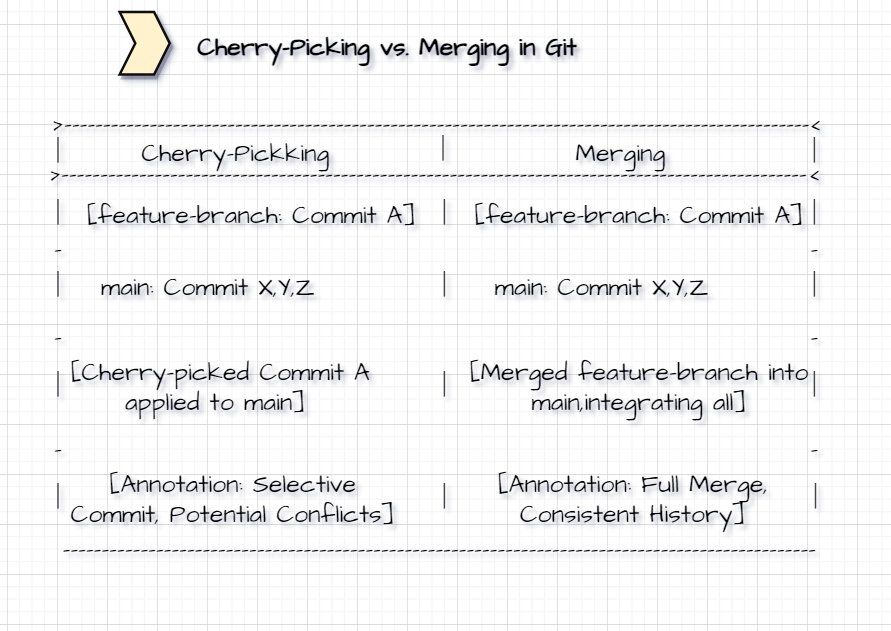
Diagram: Cherry-Picking vs. Merging in Git
To visually represent cherry-picking in Git, you can create a diagram that shows the difference between cherry-picking a commit and merging branches.
Diagram Title: Cherry-Picking vs. Merging in Git
Two Scenarios:
Left Scenario (Cherry-Picking):
Show two branches:
feature-branchandmain.Highlight a single commit from
feature-branchbeing applied tomain.Indicate potential issues like conflicts and fragmented history.
Right Scenario (Merging):
Show the same two branches.
Illustrate a full merge from
feature-branchtomain.Highlight the clean and consistent history resulting from the merge.
Key Labels and Annotations:
Highlight the selective nature on the left side with annotations like "Selective Commit" and "Potential Conflicts".
Highlight the thorough approach on the right side with annotations like "Full Merge" and "Consistent History".
++++++++++++++++++++++++Thank You++++++++++++++++++++++++++++
About the author
Linux and Cloud Administrator.
Comments
Join the discussionNo comments yet. Be the first to comment.


